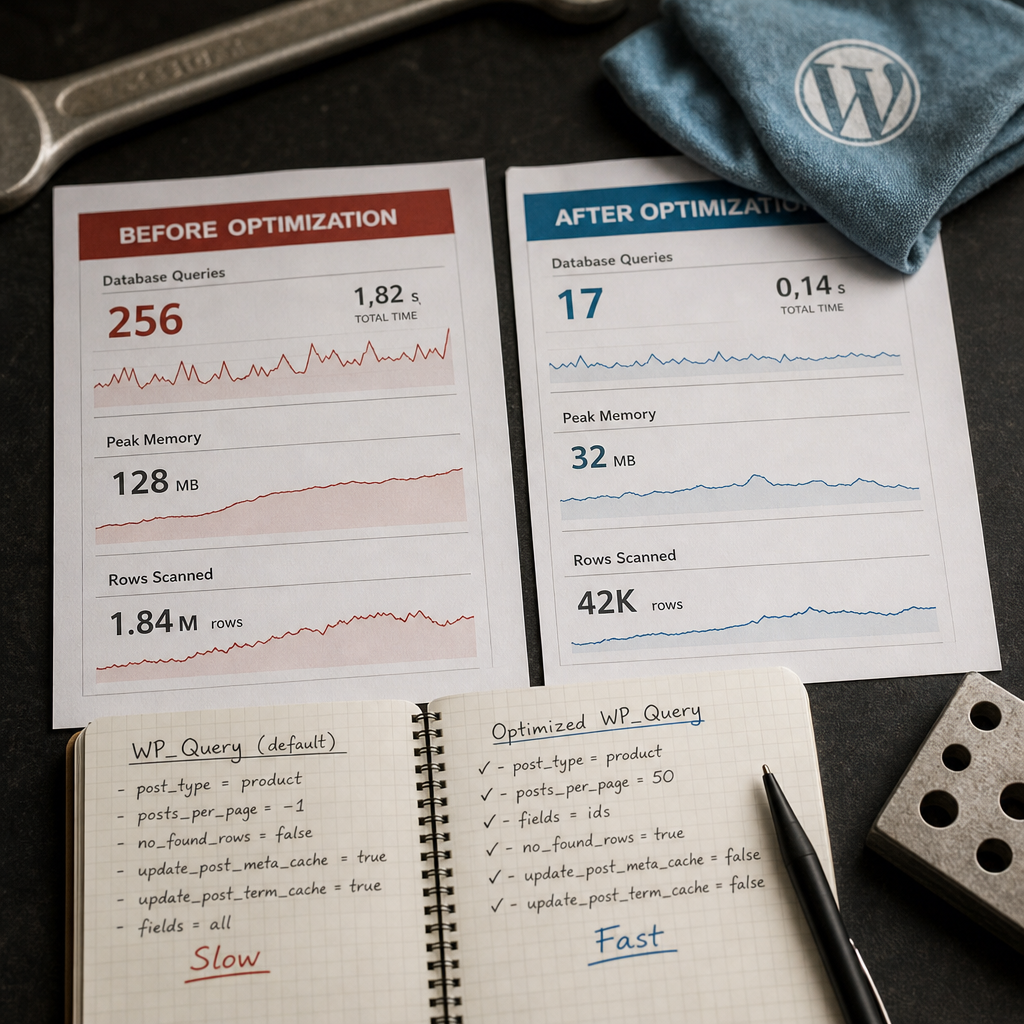
A slow WP_Query does not always mean that the WordPress database urgently needs optimization. Often, the query takes longer because the code retrieves complete post objects, loads unnecessary metadata, and calculates the total number of results.
For service queries, REST endpoints, background tasks, and administrative reports, it is usually enough to request only the data that is actually used. Choosing the right WP_Query parameters reduces PHP processing, cache operations, and MySQL load.
First, Determine Which Data You Actually Need
Before optimizing, check what happens to the query result. If the code only checks whether posts exist, builds a list of IDs, or passes identifiers to another function, there is no reason to load complete WP_Post objects.
A full result can increase memory usage and trigger additional access to post, metadata, and taxonomy caches. This may be unnoticeable for a small query, but the difference becomes significant in a background process or on a site with a large number of posts.
A useful rule is to determine the result format, number of records, and related data first, and only then define the WP_Query arguments.
- Only IDs are needed — use fields => 'ids'.
- You only need to check whether posts exist — limit the query to one post.
- Post fields are needed for a template — do not disable caches that will be used later.
- Pagination is required — do not disable result counting without understanding the consequences.
A Minimal WP_Query Configuration for a Service Query
For a task that needs to retrieve the IDs of published products, you can use the following set of parameters:
$query = new WP_Query([
    'post_type'              => 'product',
    'post_status'            => 'publish',
    'posts_per_page'         => 50,
    'fields'                 => 'ids',
    'no_found_rows'          => true,
    'update_post_meta_cache' => false,
    'update_post_term_cache' => false,
]);

$product_ids = $query->posts;
What Each Parameter Does
fields => 'ids' changes the result format: the posts property contains an array of IDs rather than complete post objects. This is especially useful for synchronization, validation, bulk updates, and passing IDs to other processes.
no_found_rows => true disables the calculation of the total number of matching posts. By default, WordPress prepares data for found_posts and max_num_pages, which are required for pagination. If the total count is not used, this calculation is unnecessary work.
update_post_meta_cache => false and update_post_term_cache => false prevent WordPress from preloading metadata and terms for the retrieved posts. These flags are useful only when the code does not access that data after the query.
- Cache parameters do not automatically speed up every query — they are appropriate only for the relevant scenario.
- If the code calls get_post_meta() for many posts after the query, disabling the cache may cause many separate database queries.
- After using fields => 'ids', do not expect the elements of $query->posts to be WP_Post objects.
When You Should Not Use no_found_rows
Do not use no_found_rows => true when the page needs to display the total number of posts, the number of pages, or accurate pagination controls. In that case, WordPress will not have complete values for found_posts and max_num_pages.
You can leave this parameter disabled for a standard paginated list. If the total number of results is not needed but records are still processed in batches in a background task, no_found_rows => true is usually appropriate.
It is important to distinguish interface pagination from batch processing. A user interface often needs the total number of pages, while an import or cleanup process only needs to retrieve the next batch and check whether it is empty.
- found_posts or max_num_pages is required — do not disable the count.
- Only the next batch of posts is needed — no_found_rows => true can reduce unnecessary work.
- Do not rely on max_num_pages in code where no_found_rows is set to true.
Use Batch Processing Instead of posts_per_page => -1
The posts_per_page => -1 parameter makes WordPress retrieve all matching posts at once. On a small site, this may go unnoticed, but on a large table it can result in a substantial amount of data, high memory usage, and long PHP execution times.
For bulk operations, use batches of 50, 100, or 500 records, for example. The right batch size depends on the complexity of the processing, the amount of metadata, and the resources available on the server.
- Limit the number of records in each query.
- After each batch, release unnecessary large arrays or objects.
- For long-running tasks, save progress so the process can resume after a failure.
- Do not run heavy processing in a single HTTP request if it may exceed execution time limits.
$page = 1;
$batch_size = 100;

while (true) {
    $query = new WP_Query([
        'post_type'              => 'product',
        'post_status'            => 'publish',
        'posts_per_page'         => $batch_size,
        'paged'                  => $page,
        'fields'                 => 'ids',
        'no_found_rows'          => true,
        'update_post_meta_cache' => false,
        'update_post_term_cache' => false,
    ]);

    if (!$query->posts) {
        break;
    }

    foreach ($query->posts as $post_id) {
        // Process one post.
    }

    $page++;
}
paged or the Last ID
The paged parameter is simple to use, but when processing very large datasets, moving to distant pages can become more expensive for MySQL because the database must skip previous rows. Changes to the dataset between batches can also result in skipped or duplicated records.
Using the last processed ID, known as keyset pagination, can be more efficient. However, WP_Query does not provide a universal standard parameter for an ID > last_ID condition in every scenario. This approach often requires carefully prepared SQL through $wpdb or a specialized query structure with guaranteed stable ordering. Do not use it without verifying the ordering and conditions.
- For ordinary batches and a small number of pages, paged is sufficient.
- For large processing queues, consider keyset pagination.
- Ordering must be stable, such as by ID or another unique combination of fields.
Post Metadata and Taxonomy Caches: Disable or Keep Them?
WP_Query can preload metadata and terms for the retrieved posts. This is convenient for a page where every post is immediately displayed with custom fields and categories. However, this preparation is unnecessary for an ID-only query or a check of basic post properties.
Disable update_post_meta_cache and update_post_term_cache only after reviewing the code that runs afterward. If the loop calls get_post_meta(), get_the_terms(), or functions that depend on this data, completely disabling the caches may increase the number of queries.
In some scenarios, it is better to keep caching enabled and retrieve the required data in a more predictable way—for example, by limiting the fields or number of records, or by moving repeated logic outside the loop.
- Only IDs and service checks are needed — metadata and term caches can often be disabled.
- Product or post cards are being displayed — caches may be useful.
- Do not evaluate these parameters in isolation; consider all the code that runs after WP_Query.
Meta Queries, Ordering, and Other Expensive Conditions
Even an efficient result format will not solve problems caused by complex query conditions. The areas requiring the most attention include meta_query, tax_query, ordering by a meta field, large post__in lists, and using offset with large datasets.
WordPress metadata is stored in a separate table, so filtering and ordering by metadata can be more expensive than querying standard post fields. If the same attribute is used regularly in critical queries, review the data structure and the actual execution plan rather than simply adding more conditions.
Do not change SQL or indexes blindly. First capture the actual slow query, inspect it with a profiling tool, and confirm that MySQL is genuinely the bottleneck.
- Do not use unnecessary meta_query or tax_query conditions.
- Do not order by a meta field unless it is required by the user experience or business logic.
- Use offset carefully with large datasets.
- Check not only SQL execution time but also memory usage and the time required for subsequent PHP processing.
How to Verify That Optimization Actually Helped
Evaluate optimization using a real scenario rather than judging the code alone. Compare the old and new query with the same parameters, number of records, and filtering conditions.
Check that the functional result has not changed, including the number of posts, ordering, status handling, and pagination behavior. Also test an empty result, a single post, and a result that reaches the batch limit.
For diagnostics, you can use WordPress profiling tools, MySQL slow-query logs, and PHP monitoring. In production, do not enable detailed logging without controlling its volume and impact on the site.
- Compare the number and execution time of SQL queries.
- Check memory usage during a single batch.
- Make sure caches are not disabled where they are needed.
- Test behavior when several background tasks run concurrently.
- Confirm that disabling found_rows does not break pagination or reports.
Common WP_Query Optimization Mistakes
The most common mistake is to add every optimization flag mechanically without checking how the result is used. This may reduce the work performed by one query but create many additional database queries in the following loop.
Another problem is replacing batch processing with posts_per_page => -1 to simplify the code. This often works with test data but creates a serious load issue as the database table grows.
You should also avoid optimizing only the SQL while overlooking external APIs, complex calculations, repeated function calls, and the lack of progress tracking in background tasks.
- Do not disable no_found_rows if the number of pages is required.
- Do not use fields => 'ids' if the following code expects WP_Post objects.
- Do not disable metadata caches without checking get_post_meta() and related calls.
- Do not run an unlimited query in cron, REST, or an administrative report.
- Do not conclude that an optimization works without testing with a dataset close to production size.
Frequently asked questions
Should you always set fields => 'ids'?
No. This parameter is appropriate when you only need identifiers. If the code displays a title, date, content, or other post properties, use the appropriate result format and do not break the subsequent logic.
Can no_found_rows => true be used with paged?
Yes, posts can still be retrieved page by page, but WordPress will not calculate the total number of results or pages. This is suitable for batch processing but not for an interface that requires accurate pagination.
Does disabling the metadata cache always reduce load?
No. If the code reads metadata for every post after the query, disabling preloading can lead to a large number of individual queries. The right choice depends on which data is actually used.
Why is posts_per_page => -1 dangerous for large tables?
WordPress will attempt to retrieve all matching posts at once. This increases the amount of data, memory usage, and execution time. For large datasets, batch processing is safer.
When should you switch from paged to fetching by the last ID?
Consider it when the dataset is large, the process runs through many pages, and the records have a stable order. This approach requires a correct query condition and is often implemented with custom SQL, so it must be tested separately.
Conclusion
WP_Query optimization starts not with adding complex indexes, but with checking which data the code actually needs. For service queries, it is usually enough to retrieve IDs, disable unnecessary result counting, and avoid loading metadata and terms when they are not required.
Large datasets should be processed in batches, while queries involving meta_query, ordering, and pagination should be tested with real data. This approach reduces the risk of overloading MySQL and makes background tasks, REST endpoints, and administrative reports more stable.