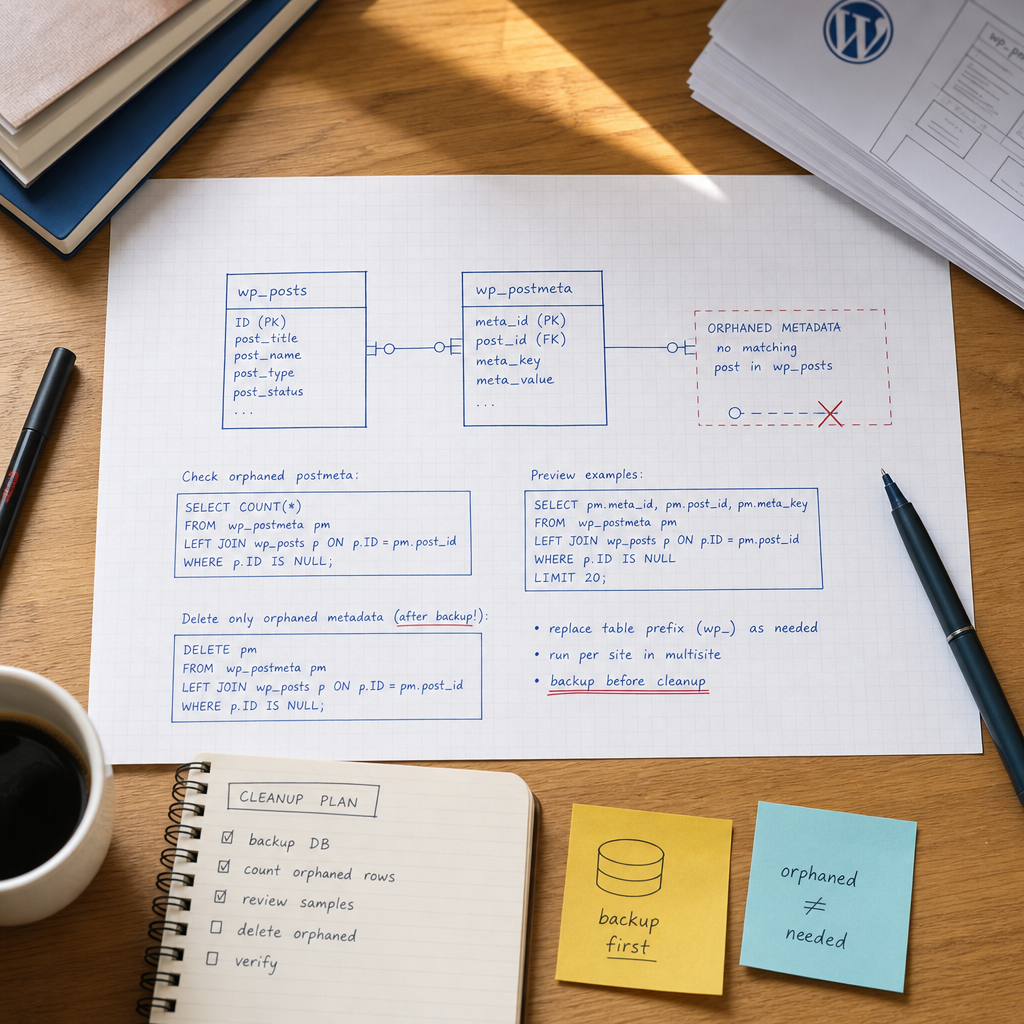
The WordPress wp_postmeta table stores additional post data, including custom field values, plugin settings, theme parameters, and other related information. After posts are deleted, an import fails, or a plugin encounters an error, some of these rows may remain without a corresponding record in wp_posts.
These rows are known as orphaned postmeta, or metadata without a parent post. They cannot restore deleted posts, but they increase the size of the table, complicate backups, and may make database maintenance more difficult. Cleanup should be performed only after verification, not by running a deletion query blindly.
What Is Orphaned Postmeta and Why Does It Appear?
Each row in wp_postmeta contains a post_id value that should correspond to a post ID in wp_posts. If a post is deleted while its related metadata remains, orphaned postmeta is created: metadata without a parent post.
The most common causes include bulk content deletion, failed imports, incorrect plugin data removal, site migrations, and manual database operations. Orphans can sometimes remain after posts are permanently deleted from the trash if a plugin or custom script did not remove the related rows.
The presence of these rows does not necessarily mean that the site is already malfunctioning. Before deleting anything, confirm that they are truly metadata for nonexistent posts rather than the result of an incorrect table prefix or an incomplete migration.
- Do not confuse orphaned postmeta with metadata belonging to trashed posts, drafts, or posts with a custom post type: those posts still have a row in wp_posts.
- Do not delete metadata simply because a particular meta_key appears unnecessary. The same key may be used by different plugins or post types.
Preparing to Check and Clean Up the Data
Run all commands below from the WordPress directory using WP-CLI. First, check which table prefix the site uses. The examples use wp_, but a real project may use a different prefix.
Create a database backup before running DELETE. Ideally, save it to a separate file and confirm that the file was created and has a non-zero size. For a critical site, you should also have a tested recovery procedure.
Do not run imports, bulk post edits, or other processes that may modify wp_posts and wp_postmeta at the same time as the cleanup.
- Confirm that WP-CLI is connected to the correct WordPress installation and database.
- Record the table prefix and do not copy a query without verifying it.
- Perform the operation during a low-traffic period.
- Save the row count and sample results from the checks performed before cleanup.
wp db export before-orphaned-postmeta.sql

wp db query "SHOW TABLES;"
How to Count Orphaned Postmeta
Use a LEFT JOIN between wp_postmeta and wp_posts to find orphaned rows. The p.ID IS NULL condition keeps only metadata for which no corresponding post was found.
This query does not delete anything, so it can be used as an initial check. If the result is zero, no cleanup is required.
wp db query "
SELECT COUNT(*) AS orphaned_count
FROM wp_postmeta pm
LEFT JOIN wp_posts p ON p.ID = pm.post_id
WHERE p.ID IS NULL;
"
Reviewing Examples and Grouping Rows by meta_key
A count alone is not enough. Review specific rows to see the post_id, metadata key, and part of the stored value. Large or serialized values should not be printed in full because they can produce excessive terminal output.
wp db query "
SELECT pm.meta_id, pm.post_id, pm.meta_key,
       LEFT(pm.meta_value, 200) AS meta_value_preview
FROM wp_postmeta pm
LEFT JOIN wp_posts p ON p.ID = pm.post_id
WHERE p.ID IS NULL
ORDER BY pm.meta_id
LIMIT 50;
"

wp db query "
SELECT pm.meta_key, COUNT(*) AS rows_count
FROM wp_postmeta pm
LEFT JOIN wp_posts p ON p.ID = pm.post_id
WHERE p.ID IS NULL
GROUP BY pm.meta_key
ORDER BY rows_count DESC;
"
How to Safely Delete Orphaned Metadata
If the check confirms that the identified rows genuinely do not belong to any post, you can delete them using the same condition. The query removes only rows from wp_postmeta for which no matching ID exists in wp_posts.
Do not replace the condition with a broader filter unless you clearly understand the consequences. In particular, you should not delete every row with a particular meta_key or all metadata belonging to old posts based only on age.
- Verify the table prefix again before execution.
- Make sure the backup was created before running DELETE.
- After the operation, check the orphaned postmeta count again with SELECT.
- If there are a very large number of rows, first test the operation on a database copy or discuss batch deletion with a database administrator.
wp db query "
DELETE pm
FROM wp_postmeta pm
LEFT JOIN wp_posts p ON p.ID = pm.post_id
WHERE p.ID IS NULL;
"
Post-Cleanup Verification
After DELETE, run the COUNT query again. Under normal circumstances, it should return zero unless another process created new problematic rows during the operation.
Also test the site in a browser, including post pages, the administration area, search, forms, and features that depend on plugins. Pay particular attention to custom post types and fields stored in postmeta.
If the table remains large, that does not necessarily mean the cleanup failed. DELETE removes rows, but the physical size of the table on disk may not decrease immediately. Table optimization should be handled separately, after creating a backup and considering locking and server load.
wp db query "
SELECT COUNT(*) AS orphaned_count
FROM wp_postmeta pm
LEFT JOIN wp_posts p ON p.ID = pm.post_id
WHERE p.ID IS NULL;
"
Multisite and Non-Standard Database Considerations
In WordPress Multisite, each site has its own post and postmeta tables, such as wp_2_posts and wp_2_postmeta. Check and clean them separately. Do not automatically assume that the first site's tables contain data for every site in the network.
For each table pair, use the correct prefix. Before processing all sites in bulk, test the query on one site and confirm that it does not affect network tables or data belonging to another installation.
If the site uses a non-standard structure, multiple databases, or an external import system, identify the data source. A plugin may recreate orphaned postmeta during the next synchronization.
- Check each prefix separately.
- Do not run a query using wp_ across the entire network unless you have confirmed that it targets the correct site.
- After cleanup, check import logs and cron jobs that may have caused the issue.
Common Cleanup Mistakes
The most dangerous mistake is running DELETE without first performing SELECT and creating a backup. Even a query that looks correct may be executed against the wrong database or with an incorrect table prefix.
Another problem is trying to reduce database size by deleting all old or unknown meta_key values. This can break functionality provided by a plugin, theme, or custom post type.
Table optimization should not be treated as a substitute for cleanup. First identify and remove only the invalid rows, then assess whether optimization is needed. If orphaned metadata keeps reappearing, look for the plugin or process creating it.
- Do not use a query without verifying the database name and table names.
- Do not delete rows based only on meta_key.
- Do not ignore the problem if it reappears after cleanup.
- Do not perform the operation on a production site without a current backup.
Frequently asked questions
Is it safe to delete all orphaned postmeta?
If the check was performed correctly and the rows genuinely have no corresponding record in wp_posts, they can be deleted. Always create a backup and review sample rows before the operation.
Will this query delete WordPress posts themselves?
No. The query deletes only rows from wp_postmeta for which no matching ID is found in wp_posts. It does not affect posts, drafts, pages, or posts in the trash.
Why did the size of wp_postmeta not decrease after cleanup?
Deleting rows and reducing the table's physical size are separate operations. The database system may keep the freed space available for reuse. Consider table optimization separately after creating a backup.
How should orphaned postmeta be cleaned up in Multisite?
Handle each table pair for the specific site separately, such as wp_2_posts and wp_2_postmeta. Check the prefixes first and run SELECT before deleting anything so that sites are not mixed up.
Conclusion
Cleaning up orphaned postmeta is a targeted database operation, not a mechanical deletion of supposedly unnecessary metadata. The safe sequence is: identify the correct tables, create a backup, count the rows, review samples, run DELETE only where no corresponding post exists in wp_posts, and verify the result.
If orphaned rows regularly appear again, the underlying problem is likely related to an import, plugin, or custom code. In that case, identify and fix the source instead of repeatedly cleaning up the database manually.