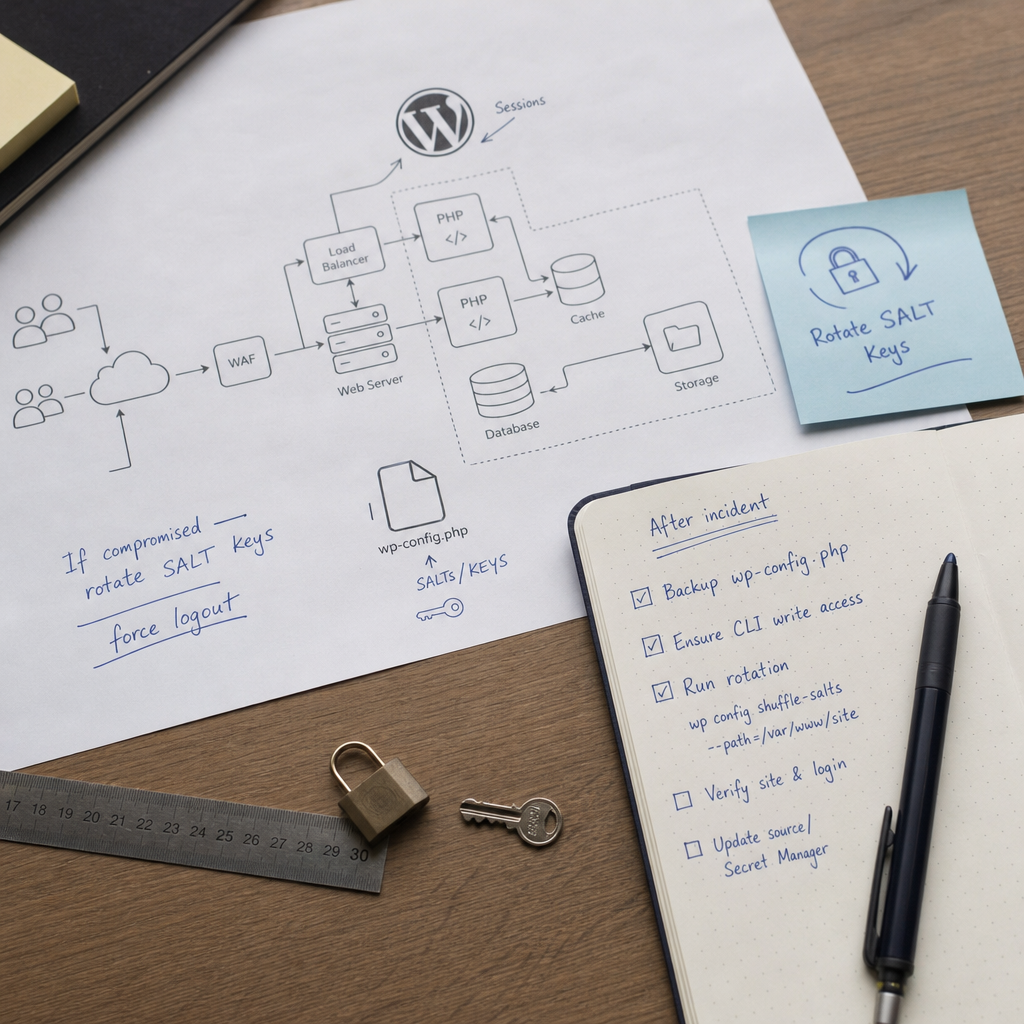
If an attacker has gained access to cookies, executed code in WordPress, or taken control of an administrator account, simply changing the password may not be enough. Stolen authentication cookies can remain valid until WordPress stops trusting them.
A quick way to invalidate these sessions is to rotate the keys and salts in the `wp-config.php` file. After the values are changed, previously signed cookies no longer pass validation, so users will have to authenticate again. However, rotating SALT keys does not remove malicious code and is not a substitute for a full incident investigation.
What WordPress SALT Keys Are and Why You Should Change Them
The `wp-config.php` file stores a set of cryptographic keys and salts that WordPress uses to sign and protect authentication cookies. These include `AUTH_KEY`, `SECURE_AUTH_KEY`, `LOGGED_IN_KEY`, and the corresponding `AUTH_SALT`, `SECURE_AUTH_SALT`, `LOGGED_IN_SALT`, and other salts.
When a user signs in to the administration area or the site, WordPress creates cookies associated with these values. If the keys are changed, previously issued cookies become invalid. This forcibly ends active sessions for regular users, administrators, and attackers who may have stolen tokens.
Rotation is especially important after cookie theft, suspected arbitrary code execution, an administrator account compromise, or a backup leak that included `wp-config.php`.
- Rotation does not change users’ passwords.
- It does not remove malicious plugins, web shells, or backdoors.
- It does not guarantee that sessions in third-party services or plugins using their own tokens will be terminated.
- All legitimate users will also be logged out after the operation.
What to Do Before Rotation
Rotation is a straightforward technical operation, but during an incident it is important not to lose evidence or overwrite the configuration incorrectly. Before changing the file, record the time, host, account, and reason for running the command.
If the attacker still has access to the server or WordPress, restrict that access first: put the site into maintenance mode if necessary, temporarily restrict administrative logins, revoke suspicious SSH keys, and check active processes. The command should preferably be run from a trusted environment and by the system user that owns the site.
Create a backup of the original `wp-config.php` with secure access permissions. Do not publish it in a version-control system, chats, or publicly accessible directories: the file may contain the database password, API keys, and other secrets.
- Verify the correct path to WordPress.
- Make sure WP-CLI runs as the required system user.
- Check that `wp-config.php` is writable by that user.
- Determine whether the file is generated during deployment from a template or Secret Manager.
- Prepare a separate channel for administrators to re-authenticate after the operation.
cp -a /var/www/site/wp-config.php /var/www/site/wp-config.php.before-salt-rotationHow to Change SALT Keys with WP-CLI
Connect to the server and run the command with the `--path` parameter pointing to the WordPress installation directory. Run the command as a user who has access to the site files and the correct PHP environment.
wp config shuffle-salts --path=/var/www/siteHow to Verify the Result
After running the command, check whether the key and salt lines in `wp-config.php` have changed. Do not output the complete file to a public log or chat message, because the new values are also secrets. If necessary, compare a reference copy from before the operation with the current file, checking only whether the relevant lines changed.
Open the site in a private browser window and test the login. A user who was authenticated before the rotation should be required to authenticate again. Also test access to `/wp-admin/`, role behavior, creation of a new session, and the site’s main functions.
- Check the permissions and owner of `wp-config.php` after the change.
- Make sure the site does not display database connection or PHP errors.
- Check web server, PHP, and WordPress logs for configuration write errors.
- Do not send the new keys to monitoring systems that are not intended to store secrets.
Checking the Site After Invalidating Sessions
Key rotation is a containment measure, not confirmation that the site has been cleaned. If the attacker installed a backdoor or gained access to the server, they may be able to create a new session after the rotation.
After terminating active sessions, review WordPress users, especially accounts with administrator and editor roles. Remove unknown accounts and check email addresses, roles, creation dates, and suspicious profile changes.
Check plugins, themes, uploaded files, and recently modified PHP files. Pay particular attention to `mu-plugins`, upload directories, cron jobs, web server configuration, and additional SSH keys. If you cannot be confident that the system is clean, restore the site from a verified backup or involve an incident-response specialist.
- Change passwords for WordPress users, hosting, SSH, the database, and the administration panel.
- Revoke or reissue API tokens, integration keys, and application passwords if the attacker may have accessed them.
- Review email, payment-service, CDN, backup, and external-integration settings.
- Update WordPress, plugins, themes, and server components after checking compatibility.
- Preserve access logs before cleaning up or rotating logs so that incident data is not lost.
When Key Rotation Will Not Work or Will Be Reverted
A common problem occurs when `wp-config.php` is not the final source of configuration. In some infrastructures, the file is created during deployment from a template, mounted from a container, or generated from a Secret Manager. If you update only the file on the current server, the next deployment may restore the old keys, allowing the sessions to work again.
In that case, change the values in the source of truth: the secret store, environment variables, configuration template, or automated deployment system. Then perform a controlled deployment and verify again that old cookies are no longer accepted.
On multisite installations, the keys are usually stored in a shared `wp-config.php`, so changing them may affect authentication across the entire network rather than just one site. Schedule the operation for a period when a mass logout will not cause problems.
- Do not manually edit the keys with random short values.
- Do not copy new salts between different environments without a specific need.
- Do not restore an old `wp-config.php` backup after rotation.
- Do not treat the absence of a WP-CLI error as proof that the site has been fully cleaned.
Common Mistakes When Rotating SALT Keys
The most dangerous mistake is limiting the response to changing the administrator password. If an attacker already has a valid cookie, changing the password may not revoke it. The password should be changed, but sessions must also be invalidated and the source of the compromise investigated.
Another mistake is running the command as `root` and then leaving the configuration with an incorrect owner or permissions. This can disrupt later deployments or service operation. Use the minimum necessary privileges and verify access after the operation.
You should also avoid immediately deleting all logs or restarting the system without a plan. First preserve the data required for analysis, and only then proceed with cleanup and security hardening.
- Do not run the command in the wrong site’s directory.
- Do not publish a backup copy of the configuration.
- Do not skip checking third-party tokens and application passwords.
- Do not postpone the search for malicious code after a successful rotation.
Frequently asked questions
Does rotating SALT keys log out all WordPress users?
Yes. Old authentication cookies should become invalid, so users, including administrators, should sign in again. Third-party plugins and services with their own tokens may follow different rules.
Do I need to change the administrator password afterward?
Yes. Key rotation invalidates sessions but does not change the password. If credentials may have been stolen, change the password and review all other privileged accounts.
Does the `wp config shuffle-salts` command remove malware or a backdoor?
No. It changes the keys and salts in the configuration, but it does not scan or clean files, the database, cron jobs, or the server. A separate investigation and remediation of the source of the compromise are required.
What should I do if WP-CLI cannot change `wp-config.php`?
Check the path, file owner, and permissions, as well as the user running the command. If the configuration is generated automatically, change the salts in the template or Secret Manager rather than only in the local copy.
Conclusion
After a WordPress compromise, rotating SALT keys with `wp config shuffle-salts` is a quick way to invalidate stolen cookies and terminate active sessions. Perform it after backing up the configuration, from the correct environment, and after verifying the source from which `wp-config.php` is generated.
Do not stop at this command: change passwords and tokens, and check users, files, logs, plugins, and the server. If the attacker can still execute code, old sessions will be invalidated only temporarily and access may be restored.