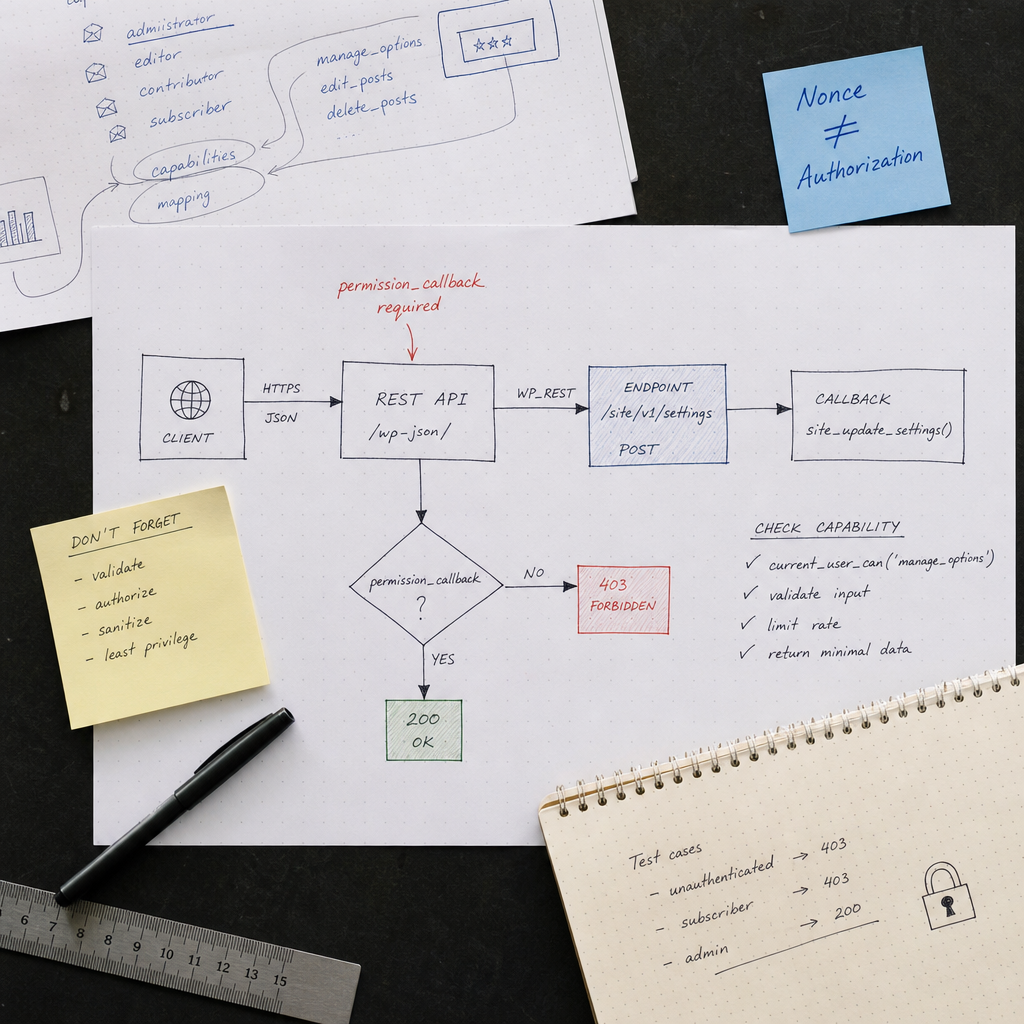
A custom REST API endpoint in WordPress lets you retrieve or modify data through HTTP requests. This is useful for JavaScript interfaces, mobile applications, and integrations, but every new route expands the attack surface.
The most common mistake is registering a route with a callback without considering exactly who should be allowed to call it. The permission_callback parameter is not a formality—it is where the endpoint's access policy is defined. Below, we will examine how to secure a route, why a nonce does not replace authorization, and how to test an endpoint for common security issues.
Why permission_callback Is Required for a Secure Endpoint
When registering a route, WordPress receives a callback that performs the action and a permission_callback that determines whether the request is allowed. If access control is missing or implemented incorrectly, the endpoint may allow anyone who knows its URL to modify data.
For administrative, internal, or state-changing routes, access should be denied by default. Do not check only whether the user is logged in; also verify the specific capability required for the operation.
- current_user_can() checks the current user's capability.
- Returning true allows the callback to execute.
- Returning false creates the standard access-denied response.
- WP_Error lets you return a custom error code, message, and HTTP status.
add_action('rest_api_init', function () {
    register_rest_route('site/v1', '/settings', [
        'methods'  => WP_REST_Server::CREATABLE,
        'callback' => 'site_update_settings',
        'permission_callback' => function () {
            if (current_user_can('manage_options')) {
                return true;
            }

            return new WP_Error(
                'rest_forbidden',
                'Недостатньо прав для зміни налаштувань.',
                ['status' => 403]
            );
        },
    ]);
});
Check Capabilities, Not Just Authentication
The is_user_logged_in() check answers only whether a user is signed in. It does not show whether that user is allowed to change settings, delete posts, or view confidential data. An authenticated editor, author, or subscriber should not automatically receive administrator-level permissions.
Choose the least powerful capability sufficient for each operation. For example, edit_post may be appropriate for editing a user's own post when the post ID is provided, delete_post for deletion, and manage_options for general site settings. Do not use manage_options for every endpoint without a specific need; it is an excessively broad capability.
When access depends on a specific resource, the check must take its ID into account. First retrieve and validate the object, then call current_user_can() with the appropriate capability.
- Site settings usually require the manage_options capability.
- For post operations, use edit_post, publish_post, or delete_post depending on the action.
- For a user's own data, also compare the owner's ID with the current user's ID.
- Do not rely on the administrator role as the only criterion; capabilities fit the WordPress permissions model better.
function site_can_edit_item(WP_REST_Request $request) {
    $item_id = absint($request['id']);

    if (!$item_id || !get_post($item_id)) {
        return new WP_Error(
            'rest_item_not_found',
            'Об’єкт не знайдено.',
            ['status' => 404]
        );
    }

    if (!current_user_can('edit_post', $item_id)) {
        return new WP_Error(
            'rest_forbidden',
            'Недостатньо прав.',
            ['status' => 403]
        );
    }

    return true;
}
A Nonce Does Not Replace Authorization
In WordPress, a nonce helps protect against CSRF attacks by confirming that a request was probably generated by an authorized interface for the user. However, a nonce is not a password, role, or standalone permission check.
A user with insufficient permissions may still have a valid nonce for their session. Therefore, even after checking a nonce, the endpoint must verify current_user_can(). Conversely, for external integrations using a token or another authentication mechanism, the presence of a nonce should not be treated as universal protection.
For requests originating in the WordPress administration area, a nonce can provide an additional verification layer. For REST APIs, check it only when the authentication scenario and client genuinely require it. The primary access-control logic should remain in permission_callback and in checks performed against the resource itself.
- A nonce protects against request forgery but does not determine a user's capability.
- A nonce has a limited lifetime, so it is not suitable as a long-term API token.
- Do not pass secret keys or passwords in exposed URL parameters.
- For each authentication mechanism, define separately how WordPress establishes the current user.
Public Endpoints Also Require Protection
Some routes should genuinely be available without authentication, such as an endpoint for listing categories or submitting data from a public form. In that case, allow access explicitly with __return_true rather than accidentally omitting permission_callback.
An open endpoint does not mean its callback can trust incoming data. Public routes are often targeted with spam, parameter probing, resource-exhaustion attempts, and requests for fields that are not intended for the client.
- Validate the type, format, length, and permitted values of every parameter.
- Limit the number of items in pagination and the maximum request size.
- Do not return passwords, tokens, internal metadata, or unnecessary fields.
- For forms, search, and expensive operations, consider rate limiting or additional anti-spam protection.
- Cache safe public responses when doing so does not risk exposing personal data.
register_rest_route('site/v1', '/categories', [
    'methods'  => WP_REST_Server::READABLE,
    'callback' => 'site_get_categories',
    'permission_callback' => '__return_true',
    'args' => [
        'per_page' => [
            'default'           => 10,
            'sanitize_callback' => 'absint',
            'validate_callback' => function ($value) {
                return $value >= 1 && $value <= 50;
            },
        ],
    ],
]);
Parameter Validation and Sanitization
Data from a REST request cannot be considered safe simply because it was sent by your form or JavaScript client. Client-side code can be bypassed by constructing a request manually.
Validation answers whether a value is acceptable. Sanitization converts it into a safe or expected format. For critical fields, it is better to validate the data first rather than silently correcting every invalid value.
Endpoint parameters can be described in the args argument of register_rest_route(). This simplifies checking types, required fields, formats, and permitted values. However, complex rules that depend on the current user or the database must be checked in permission_callback or the callback.
- For numeric IDs, use absint() and verify that the object exists.
- For text, set a maximum length and clean the value with the appropriate function.
- For email addresses, validate the format and do not rely solely on the HTML type="email" attribute.
- For lists of permitted values, validate against a whitelist.
- When saving data, use the WordPress API appropriate to the data type instead of concatenating parameters into direct SQL queries.
function site_update_settings(WP_REST_Request $request) {
    $title = $request->get_param('title');

    if (!is_string($title) || mb_strlen($title) > 100) {
        return new WP_Error(
            'rest_invalid_param',
            'Некоректний заголовок.',
            ['status' => 400]
        );
    }

    $title = sanitize_text_field($title);
    update_option('site_title', $title);

    return new WP_REST_Response(
        ['updated' => true],
        200
    );
}
Do Not Return Unnecessary Data from the Callback
Endpoint security depends not only on who can call it, but also on what it returns. Returning a complete user or post object, or the result of an internal query, may expose email addresses, internal metadata, identifiers, or other information.
Build the response from the specific fields the client needs. For standard WordPress objects, use prepared REST responses or explicitly construct an array. When reporting an error, do not expose stack traces, SQL queries, absolute file paths, or secret values.
- Define the endpoint contract: which fields it accepts and which fields it returns.
- Use WP_REST_Response or an array containing only the necessary data.
- Return clear error codes and appropriate HTTP statuses.
- Log technical details on the server, but do not include them in the client response.
return new WP_REST_Response([
    'id'    => $post->ID,
    'title' => get_the_title($post),
    'url'   => get_permalink($post),
], 200);
How to Test an Endpoint After Adding It
Testing should not be performed only through your own administrative interface. Send requests without authentication, as a user with insufficient permissions, and as a user who is authorized to access the endpoint.
For endpoints that modify data, also test repeated submissions, invalid parameter types, missing required fields, and attempts to access another user's resource.
- Without authentication, a protected route should return 401 or 403, depending on the authentication mechanism.
- An authenticated user without the required capability should receive 403.
- An authorized user should pass permission_callback and the appropriate validation.
- An unknown ID or resource should return 404 rather than another object's data.
- Invalid parameters should result in a 400 error or the standard REST API error.
- Verify that the callback does not perform part of the operation before all checks are complete.
curl -i -X POST \
  'https://example.com/wp-json/site/v1/settings' \
  -H 'Content-Type: application/json' \
  --data '{"title":"Нове значення"}'
Common Mistakes When Securing the WordPress REST API
The most dangerous problems often result not from sophisticated vulnerabilities, but from assuming that an endpoint will be called only by your own interface. A REST route is available over HTTP, so it can be called manually, repeatedly, or with unexpected parameters.
Security must be implemented on the server and must not depend on a hidden URL, a button label, or checks performed in JavaScript.
- Omitting permission_callback or unconditionally returning true for a private route.
- Checking only is_user_logged_in() instead of verifying a capability.
- Using a nonce as a substitute for authorization.
- Trusting form data without server-side validation.
- Checking permission to access the endpoint but not the specific post ID or user ID.
- Returning a complete object containing private fields.
- Failing to limit public search, import, or form-submission operations.
- Changing data before all checks are complete and checking the result only after saving it.
Frequently asked questions
Can __return_true be used for any REST API endpoint?
Only for genuinely public routes that do not require authentication. Even then, validate parameters separately, limit the response size, and plan protection against spam and excessive request rates.
Which HTTP status should be returned to a user without the required permissions?
403 Forbidden is usually used when the user is known but does not have sufficient permissions. For an unauthenticated request, the exact response may depend on the authentication mechanism and WordPress logic.
Is checking a capability in the callback enough?
It is better to place the general access check in permission_callback and perform additional checks for the specific resource and parameters before the operation. Authorization and validation should not rely solely on client-side code.
Is a nonce required for the WordPress REST API?
A nonce can provide additional CSRF protection in scenarios that use a user session, but it does not replace permission_callback, capability checks, or another authentication mechanism.
How can I tell whether an endpoint is properly secured?
Test the route without authentication, as a user with insufficient permissions, and as an authorized user. Also test invalid parameters, other users' IDs, repeated requests, and the data returned by the endpoint.
Conclusion
A secure custom REST API endpoint starts with a clear access model. For private routes, use permission_callback and check the capability required for the specific operation. For resources with an owner, verify not only the user's role but also ownership of the specific object.
A nonce can complement CSRF protection, but it does not define a user's permissions. Regardless of the endpoint type, the server must validate incoming data, minimize the response, and handle errors correctly. After implementation, test the route with different access levels—the expected denial should be 403, not callback execution.