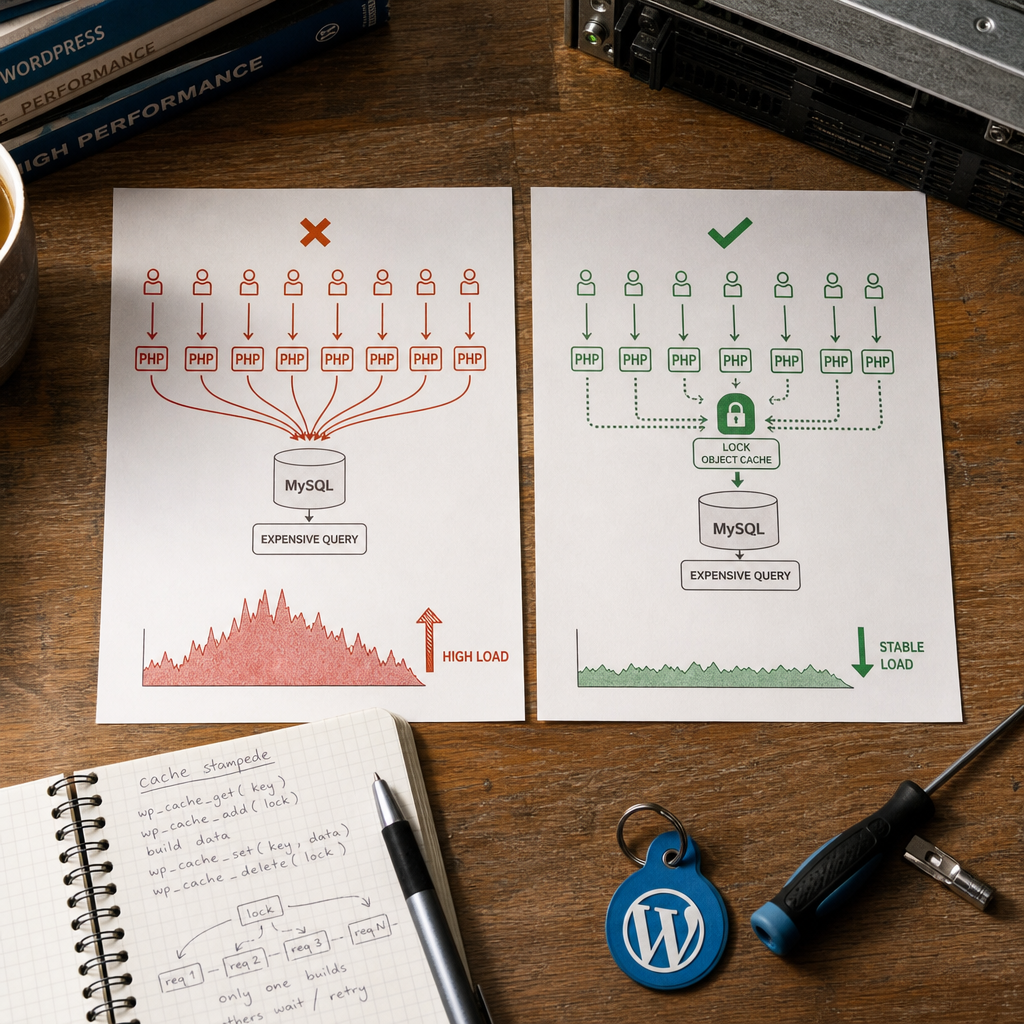
A cache stampede occurs when a popular cached object expires for a large number of requests at nearly the same time. Each PHP process sees an empty cache and attempts to run the same expensive SQL query, call an external API, or build a complex report independently.
As a result, the cache that was supposed to reduce load becomes the cause of a spike affecting MySQL, PHP workers, or an API. In WordPress, the problem is usually solved with a short-lived lock in a persistent Object Cache: only one request rebuilds the data, while the others use a fallback, stale value, or wait for a limited time.
What Is Cache Stampede and How Does It Occur?
Suppose a popular report is stored in Object Cache for five minutes. When the TTL expires, dozens or hundreds of simultaneous requests receive a cache miss. If the code has no protection, each request runs my_build_report() and performs the same expensive operation.
The problem is especially noticeable on high-traffic pages, in REST APIs, during mass cron runs, and after Redis or Memcached is flushed. Even if a single SQL query does not seem critical, running it in parallel across many PHP processes can exhaust database connections.
- simultaneous expiration of the TTL for a popular key;
- repeated execution of expensive SQL queries;
- an increase in the number of PHP workers and response time;
- peak load on MySQL or an external API;
- a chain reaction: a slow database slows down the entire site.
When Does an Object Cache Lock Actually Work?
Protection requires a shared persistent object cache, usually Redis or Memcached, connected to WordPress through the appropriate drop-in. WordPress's standard object cache without a persistent backend often exists only for the duration of a single PHP request. In that case, different requests cannot see the same lock, so protection against cache stampede does not work.
The key operation is wp_cache_add(). It adds a key only when that key does not already exist. When the backend works correctly, this allows one request to acquire the lock while the others recognize that a rebuild is already in progress.
Before implementation, verify that the production environment is actually using Redis or Memcached, rather than merely having a plugin installed without an active drop-in. Also test behavior after a PHP restart, cache flush, and lost connection to the backend.
- the lock must be short-lived and have a TTL;
- the lock key must be separate for each expensive object;
- the lock TTL must cover the normal operation duration without remaining indefinitely;
- do not use one global lock for the entire site.
Basic Protection Implementation in WordPress
The following is a simplified pattern for a report or another expensive operation. The request that acquires the lock builds the data and stores it in the cache. Other requests do not run the same operation again; they can use a fallback value or retry the read after a short delay.
The custom group helps logically separate the keys used by this mechanism. Key names should be specific to the object, site, language, or parameter set when the result depends on those values.
$key   = 'expensive_report:v1';
$group = 'custom';
$lock  = 'lock:' . $key;

$found = false;
$data  = wp_cache_get($key, $group, false, $found);

if (!$found) {
    // The lock TTL must be longer than the report's usual build time.
    if (wp_cache_add($lock, 1, $group, 30)) {
        try {
            $data = my_build_report(); // SQL query or API request

            if (false !== $data && null !== $data) {
                wp_cache_set($key, $data, $group, 300);
            }
        } finally {
            wp_cache_delete($lock, $group);
        }
    } else {
        // Another request is already rebuilding the data.
        $data = my_get_stale_report_or_fallback();
    }
}

return $data;
Why You Should Not Simply Run the Operation After a Cache Miss
Checking the cache and then starting an expensive function without a lock creates a race condition: multiple processes see that the key is missing at the same time. The lock acquisition operation must be wp_cache_add(), not a sequence of wp_cache_get() followed by wp_cache_set().
Also handle data-building errors. If the API returns an error or the SQL query fails, do not store an empty or invalid result with a long TTL. Otherwise, a temporary failure becomes a cached result.
- use a separate lock for each parameter set;
- always set a TTL for the lock;
- release the lock in a finally block when compatible with your PHP version;
- do not treat a false value as a reliable cache miss indicator without checking the found parameter.
What Should Requests That Failed to Acquire the Lock Return?
The best option depends on the data type and freshness requirements. For catalogs, statistics, or recommendations, returning the previous version of the result is often sufficient. For critical data, you can retry the read after a short delay, but the wait must be limited to avoid creating a new queue of PHP processes.
A practical approach is to store the current result and a stale copy under different keys. If the primary key is empty while the lock is already held, the code returns the stale value. The user receives a fast response while one background or regular request completes the update.
If no fallback is available, return a safe empty result, an HTTP error, or a temporary-unavailability message, depending on the context. A controlled fallback is preferable to running the same expensive query in every process.
- stale-while-revalidate for data that can be slightly outdated;
- a short retry of the cache read for small operations;
- a fallback result from the database or a local configuration value;
- a controlled error response for critical API operations.
TTL, Jitter, and Protection Against a Second Wave of Requests
Using the same TTL for a large number of keys can create several waves of load. This can happen when objects are written simultaneously after a cache flush or a mass import.
For independent objects, you can add a small random interval to the TTL. For example, a base duration of 300 seconds can be varied by several dozen seconds. This spreads expiration over time, but it does not replace a lock: even with jitter, one popular key may still be requested simultaneously by many processes.
The lock TTL should be selected based on the actual operation duration. If a report usually takes three seconds to build, 30 seconds may be sufficient. If building it sometimes takes longer than the TTL, the lock will expire too early and a second process will start duplicating the work.
- do not use an excessively short lock TTL;
- do not set an excessively long TTL that delays recovery after a process failure;
- add jitter to data TTLs when many keys are created simultaneously;
- for very long tasks, consider a queue or background generation instead of waiting within an HTTP request.
$base_ttl = 300;
$jitter   = wp_rand(0, 30);
$ttl      = $base_ttl + $jitter;

wp_cache_set($key, $data, 'custom', $ttl);
Important Limitations and Common Mistakes
wp_cache_add() is useful as an atomic lock only when the specific persistent backend and drop-in support this operation correctly. Do not rely on behavior in a local testing environment if production uses a different Redis or Memcached setup.
Simply deleting the lock after the operation finishes also has a potential issue: if the build takes longer than the TTL, the lock may already have been transferred to another request. When the first process finishes, it could delete the new owner's lock. For the highest requirements, a backend-specific mechanism is needed to verify ownership and delete the lock atomically, such as a Redis-level operation. In typical WordPress code, minimize this risk by choosing the TTL correctly and avoiding excessively long synchronous tasks.
Do not use one lock key for all reports or for the entire site. A slow report would then block independent operations. At the same time, excessively detailed keys can create many parallel rebuilds, so the lock scope should be determined by the actual cost of the operation.
- do not confuse Object Cache with page cache: the lock must be available to all PHP processes;
- do not store a result in the cache after an error or incomplete API response;
- do not perform infinite polling within a user request;
- do not flush all of Redis because of one problematic key when you can delete only the required group or key version.
How to Verify That the Protection Works
Perform testing under conditions close to production. First, verify that repeated reads of the same key actually return data from Redis or Memcached. Then clear the specific key and generate parallel requests to the endpoint or page that runs the expensive operation.
Temporarily log lock acquisition, cache hits, cache misses, build duration, fallback usage, and backend errors. During the test, only one my_build_report() execution should occur, rather than a separate execution for every parallel request.
Also test scenarios involving slow SQL, API errors, a Redis restart, PHP process termination, and a lock TTL being exceeded. Monitoring should show not only the cache-hit rate, but also response time, the number of MySQL connections, and how often popular keys are rebuilt.
- verify that the persistent object cache is active in production;
- compare the number of cache misses with the number of actual rebuilds;
- test behavior during simultaneous requests after clearing a key;
- track lock timeouts and fallback activations;
- make sure a cache failure does not trigger an uncontrolled flood of SQL queries.
Frequently asked questions
Will wp_cache_add() protect against cache stampede without Redis or Memcached?
Not reliably. Different PHP requests need shared persistent storage. If Object Cache exists only within a single request, processes cannot see the same lock.
What should the lock TTL be?
It should be longer than the normal execution time of the expensive operation, but limited so the lock disappears automatically after a failure. Base it on measured build duration and add a safety margin.
Can all other requests be forced to wait for the rebuild to finish?
You can perform several short retries with a delay, but this must be limited. For most pages, returning a stale value or fallback is safer than creating a queue of PHP processes.
Is adding a random TTL enough instead of using a lock?
No. Jitter reduces the likelihood that different keys will expire at the same time, but it does not solve the problem of dozens of processes requesting one popular key simultaneously.
What should I do if the operation takes longer than the lock TTL?
Increase the TTL based on measurements, optimize the SQL or API request, and consider background generation through a queue. Also account for the risk of the lock being acquired again after it expires prematurely.
Conclusion
Protection against cache stampede in WordPress consists of three parts: a shared persistent Object Cache, atomic lock acquisition, and correct behavior for requests that fail to acquire the lock. One process rebuilds the expensive data while the others use a stale result, fallback, or a short retry.
Start by verifying Redis or Memcached, separate lock keys by specific objects, set a realistic TTL, and monitor cache misses and actual rebuilds. This helps reduce MySQL load spikes without creating a new bottleneck in PHP.