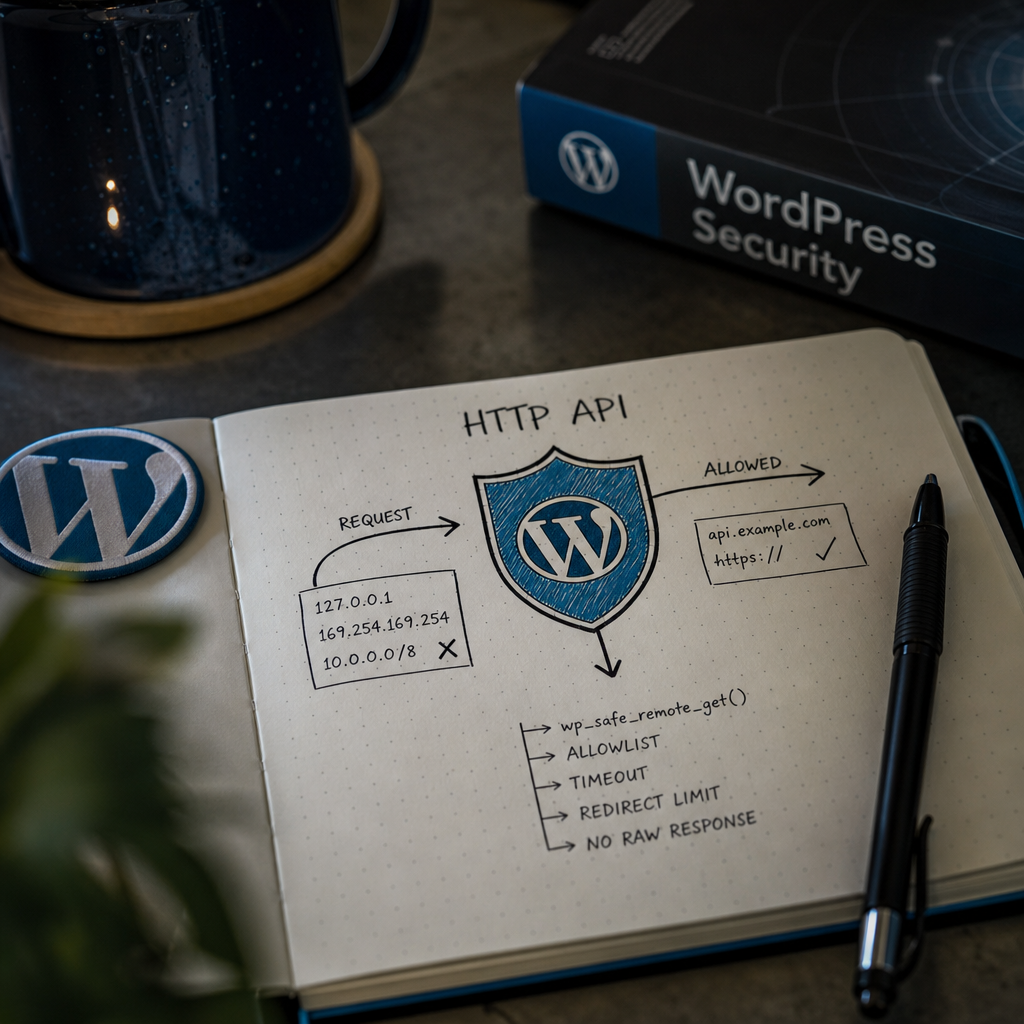
WordPress plugins and integrations regularly make external HTTP requests: retrieving data from APIs, sending webhooks, importing content, or checking licenses. The problem arises when the URL is fully or partially controlled by the user.
In that situation, an attacker may try to make the site connect not to an external service, but to an internal network, an administration panel, a local service, or cloud environment metadata. This attack is known as SSRF—Server-Side Request Forgery. Below, we will examine how to reduce the risk at the WordPress HTTP API and server architecture levels.
What Is SSRF in WordPress?
SSRF occurs when a server makes an HTTP request to an address that can be changed through a request parameter, form field, REST API, or setting available to an untrusted user. For example, a plugin may receive a URL from a url parameter and pass it to wp_remote_get().
An attacker may provide the address of a local service, a loopback address, or a private IP range. Typical examples include 127.0.0.1, ::1, 169.254.169.254, 10.0.0.0/8, 172.16.0.0/12, and 192.168.0.0/16. The danger is not limited to reading a response: an internal request may change a service's state or use credentials available to the server.
In WordPress, the risk does not arise only from custom code. It can also be introduced by plugins for importing, webhook integrations, remote image loading, license verification, and API proxying.
- The URL is built from a GET, POST, or REST parameter without validation.
- The code allows any scheme, including unexpected protocols.
- The HTTP client automatically follows a redirect to another unexpected host.
- The internal service's response is returned to the user without filtering.
Why wp_safe_remote_get() Is Better Than wp_remote_get() for Unpredictable URLs
When the URL cannot be determined in advance, use wp_safe_remote_get() or wp_safe_remote_request(). These functions are intended for requests to potentially dangerous addresses and apply additional URL safety checks in the WordPress HTTP API.
However, a safe function is not a complete replacement for an allowlist. It reduces risk, but business logic must still determine which services the application is allowed to contact. esc_url_raw() is not SSRF protection either: it sanitizes a URL for storage or transmission but does not verify that the host is safe.
- Limit request execution time with a timeout.
- Reduce the number of automatic redirects.
- Check is_wp_error() before reading the response.
- Do not return the raw body, headers, or technical error details to the user.
$url = esc_url_raw( wp_unslash( $_GET['url'] ?? '' ) );

$response = wp_safe_remote_get(
    $url,
    [
        'timeout'     => 5,
        'redirection' => 2,
    ]
);

if ( is_wp_error( $response ) ) {
    wp_send_json_error( [ 'message' => 'Не вдалося отримати дані.' ], 502 );
}

$status_code = wp_remote_retrieve_response_code( $response );
$body        = wp_remote_retrieve_body( $response );
The Best Approach: Host and Scheme Allowlists
If an integration works with a specific service, do not accept an arbitrary URL. Allow only the expected scheme, host, and, when necessary, port. For example, a payment API may be limited to https://api.example.com.
Validation must be performed before the HTTP request. For reliability, normalize the hostname to lowercase, do not allow credentials in the URL, and do not rely on string checks with strpos(). Such checks may allow a deceptive domain such as api.example.com.attacker.test.
- Allow only HTTPS when the integration does not require HTTP.
- Compare the complete hostname, not just part of it.
- Explicitly define permitted ports or accept only the standard HTTPS port.
- Where possible, build the URL yourself from a fixed host and accept only a path or identifier from the user.
$raw_url = esc_url_raw( wp_unslash( $_GET['url'] ?? '' ) );
$parts    = wp_parse_url( $raw_url );

$allowed_host = 'api.example.com';
$scheme       = strtolower( $parts['scheme'] ?? '' );
$host         = strtolower( $parts['host'] ?? '' );
$port         = (int) ( $parts['port'] ?? 443 );

if (
    'https' !== $scheme ||
    $allowed_host !== $host ||
    443 !== $port
) {
    return new WP_Error( 'blocked_url', 'URL не дозволено.' );
}

$response = wp_safe_remote_get(
    $raw_url,
    [
        'timeout'     => 5,
        'redirection' => 0,
    ]
);
Additional Control with pre_http_request
The pre_http_request filter can block unwanted outbound HTTP requests at the WordPress level. This is a useful defensive layer for projects that need centralized control over permitted addresses.
At the same time, the filter applies globally to the HTTP API. An overly strict rule may break updates, integrations, or other plugins. Before implementing it, check which external hosts the site actually uses and document any exceptions.
- Validate the scheme and host, not just whether the domain appears in the URL.
- Return a WP_Error for a blocked request.
- Do not rely solely on this filter: validation must also exist in the code for each integration.
- Do not log the complete URL if it may contain tokens or personal data.
add_filter( 'pre_http_request', function ( $pre, $args, $url ) {
    $parts = wp_parse_url( $url );
    $host  = strtolower( $parts['host'] ?? '' );
    $scheme = strtolower( $parts['scheme'] ?? '' );
    $port  = (int) ( $parts['port'] ?? 443 );

    if (
        'https' !== $scheme ||
        'api.example.com' !== $host ||
        443 !== $port
    ) {
        return new WP_Error(
            'blocked_host',
            'HTTP host is not allowed.'
        );
    }

    return $pre;
}, 10, 3 );
Redirects, DNS, and Private IP Addresses
Validating the initial URL is not always enough. An allowed external host may respond with a redirect to another address. Therefore, for integrations with a fixed API, it is better to disable redirects or set a minimal redirect limit and validate every final address.
DNS introduces another risk: a domain may resolve to a private or loopback address, change its IP after the initial check, or exploit DNS resolver behavior. A simple domain name comparison does not guarantee that the request will physically go to the Internet.
For critical systems, add outbound traffic controls at the network level. A WordPress server should not be allowed to make arbitrary outbound connections to internal segments. Use a firewall, network rules, or a separate proxy service with its own allowlist.
- For a known API, set redirection => 0.
- Do not allow URLs with nonstandard schemes or unusual ports.
- Validate both IPv4 and IPv6 if the application handles IP addresses directly.
- Do not consider PHP-level DNS validation sufficient protection for cloud infrastructure.
Secure Response and Error Handling
SSRF can be dangerous even when the user cannot see the response directly. Therefore, control the HTTP status, response size, content type, and data format. If JSON is expected, decode only JSON and reject other content types.
Return a general message to the user and record technical details in a controlled log without secrets. Do not output the full internal service response, headers, URLs containing tokens, or exception messages.
- Check for 2xx status codes before processing the body.
- Set timeout limits and do not allow unlimited downloads.
- Do not send cookies, Authorization headers, or internal service headers to an external URL unless necessary.
- Keep WordPress, PHP, and plugins updated because HTTP security depends on the current stack.
$response = wp_safe_remote_get(
    'https://api.example.com/data',
    [
        'timeout'     => 5,
        'redirection' => 0,
        'headers'     => [
            'Accept' => 'application/json',
        ],
    ]
);

if ( is_wp_error( $response ) ) {
    return new WP_Error( 'remote_failed', 'Зовнішній сервіс недоступний.' );
}

$status = wp_remote_retrieve_response_code( $response );
$body   = wp_remote_retrieve_body( $response );

if ( $status < 200 || $status >= 300 ) {
    return new WP_Error( 'remote_status', 'Зовнішній сервіс повернув помилку.' );
}

$data = json_decode( $body, true );

if ( ! is_array( $data ) ) {
    return new WP_Error( 'invalid_response', 'Отримано некоректний формат даних.' );
}
WordPress Project Review Checklist
Start by searching the code for calls to wp_remote_get(), wp_remote_post(), wp_remote_request(), and low-level HTTP clients. Check where the URL comes from and whether an unauthenticated user can change it.
After making changes, test not only the permitted API but also common SSRF cases. Make sure loopback, private, and link-local addresses, unexpected ports, alternative schemes, redirects, and deceptive domains are blocked.
- Find every place where the site makes outbound HTTP requests.
- Replace arbitrary requests with wp_safe_remote_get() or wp_safe_remote_request() where appropriate.
- Add an allowlist for known integrations.
- Set a short timeout and control redirects.
- Remove secrets from headers and URLs sent externally.
- Review logs, firewall settings, and outbound traffic rules.
- Repeat the audit after installing a new plugin or integration.
Frequently asked questions
Is replacing wp_remote_get() with wp_safe_remote_get() enough?
No. This is an important baseline protection for unpredictable URLs, but the most reliable approach combines an allowlist of specific hosts and schemes, redirect controls, and outbound traffic restrictions at the server level.
Does esc_url_raw() protect against SSRF?
No. The function sanitizes a URL but does not determine whether the host belongs to an allowed service or whether it leads to a private network.
Can any subdomain of example.com be allowed?
Only if it is genuinely required and you validate the domain zone correctly. A contains or ends_with comparison without checking domain boundaries may allow a deceptive domain. For critical integrations, it is better to specify the exact host.
What should I do if integrations require redirects?
Limit the number of redirects, validate every address, and do not allow redirects to other schemes, ports, or unapproved hosts. If redirects are not required, disable them.
Conclusion
Protecting the WordPress HTTP API from SSRF starts with the principle of least privilege: the site should connect only to the services required for its operation. For arbitrary URLs, use safe HTTP functions; for known integrations, use a precise allowlist.
Add short timeouts, redirect controls, secure error handling, and network restrictions. This layered model significantly reduces risk, even if one of the plugins still contains an unsafe HTTP request.